A useful plumbing website helps a homeowner answer three questions: Can you fix my problem? Do you work in my area? How do I contact you? The page structure should make those answers easy to find, rather than making the visitor decode a long list of technical services.
Start with the work you actually offer and the way your team handles enquiries. A sole trader who takes calls needs a different setup from a larger company with live scheduling and dispatch software. Here is a practical starting point for discussing the scope with a designer.
Start with five clear pages
Home: introduce the business, main services, actual coverage and next contact step. Show a clear phone link and a short route to requesting a visit. If you advertise emergency work, state the hours and arrangements you genuinely provide; a website should not promise 24/7 availability on your behalf.
Services: organize the work around recognizable customer needs, such as leaks, drain problems, water heaters and fixture installations. Explain what you do and how a customer starts a conversation. A larger company may need dedicated service pages, but every extra page needs useful, specific content and an agreed place in the budget.
Service Areas: list the towns or neighborhoods you genuinely cover, along with relevant travel or availability limits. A map can support this information, but a readable place list is useful too. Do not publish a collection of identical town pages just to make the website look bigger.
About: explain who runs the business and how the team works. Add authorized team photos and accurate qualifications where available. This is also a suitable place for a concise explanation of how assessments, estimates and visits are arranged.
Contact: bring together the phone number, opening hours, email or form, and any instructions about urgent requests. Make it clear whether submitting a form requests a callback or creates an actual appointment. Those are different promises.
These five pages are a planning example, not a rule. If commercial work, drain services or hot water systems need detailed explanations, agree the revised structure before the project starts.
What our Clearflow sample demonstrates
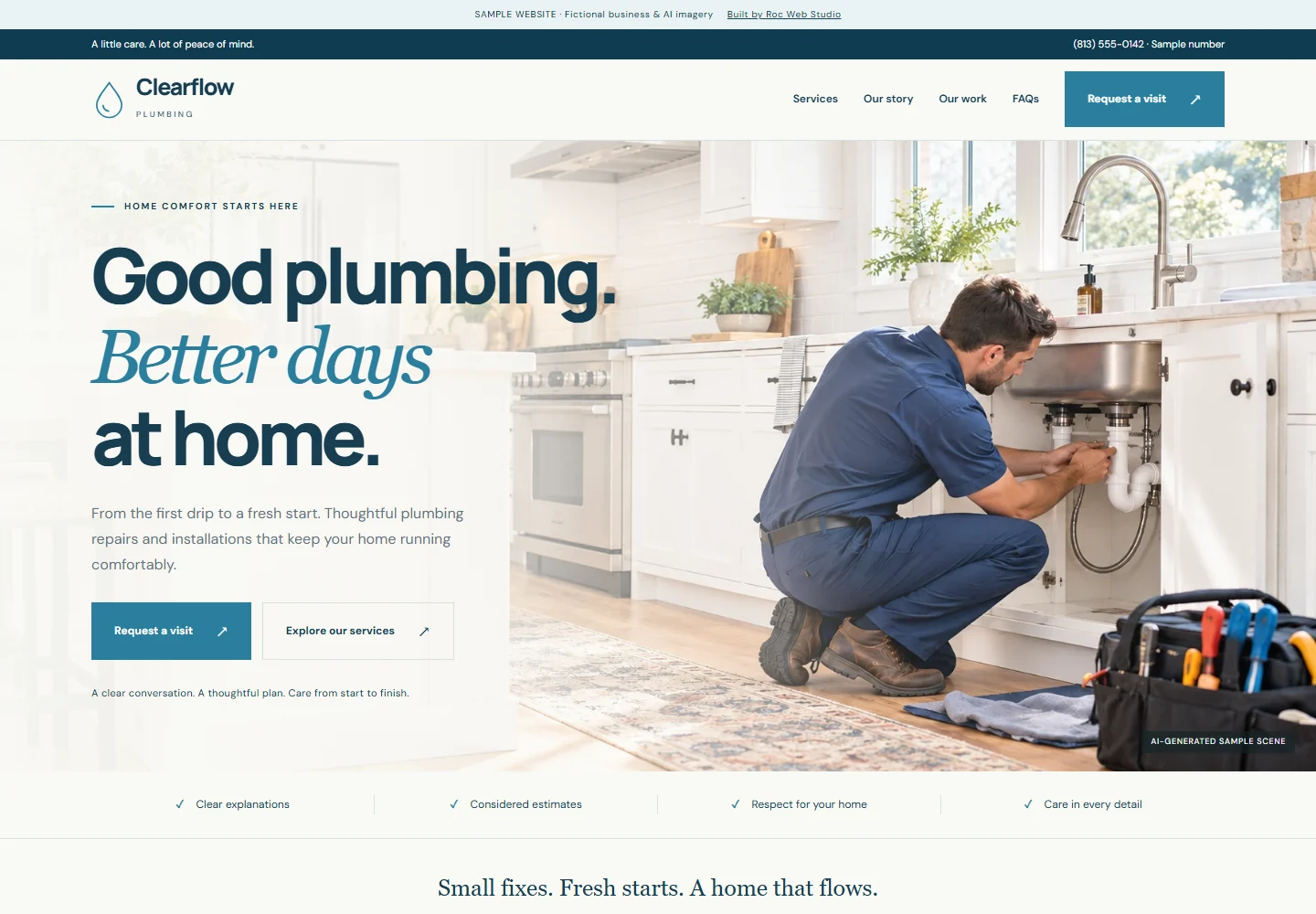
The Clearflow Plumbing sample website illustrates one possible design. It is a fictional demonstration, with illustrative images, reviews and business details; it is not evidence of customer results. Its sample form does not send an enquiry.
Notice how the main message describes residential plumbing in plain language and keeps the request-a-visit action visible. Further down, separate service sections distinguish repairs, hot water, drains and fixtures. A process section explains the conversation and assessment before the visitor reaches the enquiry form.
On a real business website, replace every sample phone number, service area, review and availability claim with accurate information. Our website design service for plumbers explains how we adapt the structure to your business.
The essential features to agree first
- Readable mobile layouts: customers should be able to read services, open the menu and use contact controls without zooming or scrolling sideways.
- Click-to-call links: place the correct phone number where it is easy to find. A phone link should dial your actual number, including the appropriate country code.
- A short enquiry form: ask for contact details, the type of work and a brief description. Explain what happens after submission and how quickly you normally respond. Do not ask for payment details or account passwords.
- Real business evidence: use authorized job photos, genuine feedback and credentials you can substantiate. If you have no reviews yet, a clear process and accurate service information are more useful than invented testimonials.
- Basic search foundations: give each page a descriptive title, a clear heading and relevant internal links. Include a sitemap and make sure the public pages can be crawled. This does not guarantee search rankings or enquiries.
- A tested contact route: check that a real submission reaches the correct inbox, and that the visitor sees a clear success or failure message. A form that looks finished has not necessarily been connected.
Features that may need an additional budget
An enquiry form is not a live appointment system. If customers must choose an available time, the website needs an agreed source of availability and a way to avoid conflicting bookings. Connecting an existing field-service platform may be more practical than commissioning a separate system.
Online deposits and payments need their own scope, including payment-provider fees, confirmation messages and who handles refunds. Photo uploads add storage and information-handling requirements. A customer portal, automated quote calculator or dispatch integration is a further step again.
Also ask whether you need a self-editing system. A finished website and an editor you can operate yourself are not automatically the same deliverable. Decide who will update hours, services and photos after launch, and how changes are charged.
What to send before asking for a quote
Prepare your real service list, coverage, opening hours, contact details and preferred response process. Add your logo, authorized photos and permission to publish any customer feedback. Share the existing website address if there is one, and name any booking or business software you want to keep using.
Your designer should then be able to distinguish the core website from optional integrations. Ask for the page count, content responsibilities, revision allowance, ownership arrangements and launch checks in writing.
A concrete starting scope with Roc Web Studio
Our Starter website package starts at $599 USD for up to five pages total, for one business and one language, including mobile-friendly design, contact form setup, basic on-page SEO, refinement of your supplied English copy (up to 500 words per page) and two consolidated revision rounds. Optional Essential Care starts at $49 USD per month. It covers hosting configuration, technical checks, backups and form tests; editing time is available only in higher care plans. Standard static websites can use free Cloudflare Pages hosting within its plan limits without a care subscription. These are our published prices, checked October 30, 2026; they are not an industry-wide average.
Extra pages, booking tools, paid assets, domain registration and custom integrations are separate unless included in your proposal. Confirm the current scope and terms on our pricing page.
To discuss your own website, explore our plumbing website service, view the Clearflow sample, or request a free homepage concept. Send the services and areas you cover, and tell us whether you need calls, enquiries or confirmed bookings.