A homeowner finds your website at 9:40 on a Tuesday night. Ninety seconds later they know what the job should cost, they have picked a preferred date, and a request with a reference number is waiting for you. The next morning you open a workbench, check your route, adjust one line on the quote, send it — and the job moves onto the calendar.
That is the workflow this article describes. Not a slogan like "get more leads," but the actual mechanics: what the customer answers, what the website calculates, what lands on your side, and where exactly a request becomes a confirmed booking. We built two live demos to show every stage — a cleaning quote system and a pressure washing quote system — and everything below is how they actually behave, step by step.
One workflow, two people
A quote-to-booking flow serves two readers at once, and it fails when it is designed for only one of them.
The customer wants three things: a price without a phone call, a sense of when the work could happen, and the feeling that the number they saw is the number they will be billed. If any of those is missing, they go back to the search results and try the next company.
The owner wants different things: requests that arrive with the details needed to say yes or no quickly, a way to sort serious requests from vague ones, and control over what the business has promised. A website that auto-books jobs while the owner sleeps feels efficient until the calendar fills with visits nobody can staff.
The demos are built around both sides. The customer gets an instant estimate with the full breakdown; the owner gets a workbench where every request arrives with its numbers attached. Neither side ever sees a number the other side does not.
The customer side: four short steps
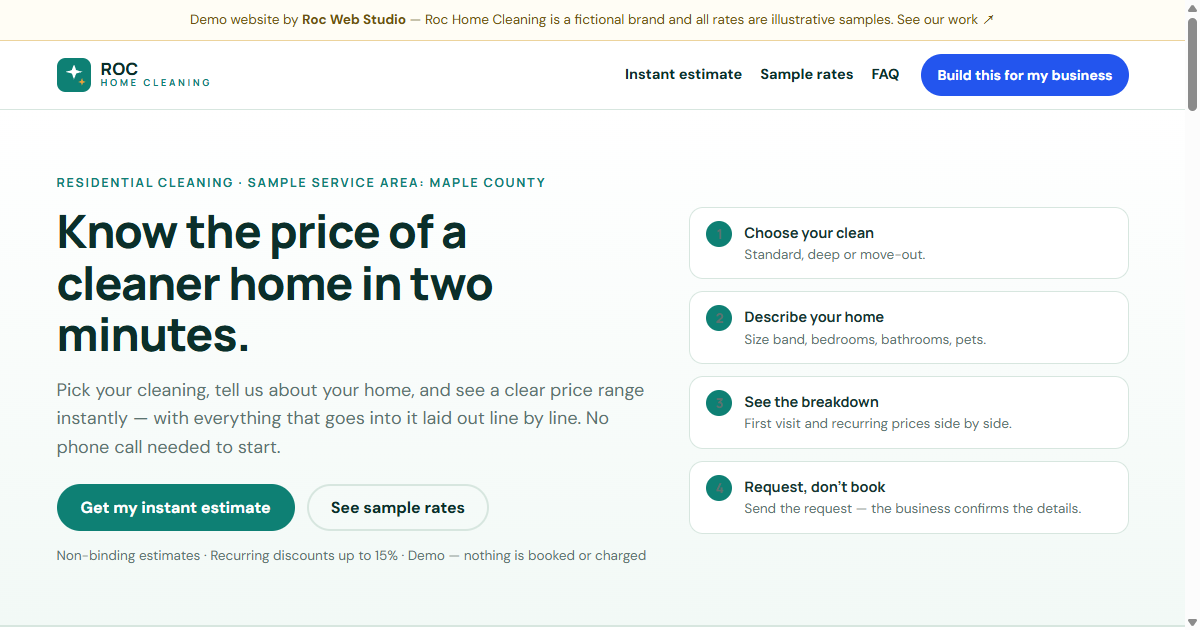
The cleaning demo opens with a single question — which type of clean do you need? — and walks forward one screen at a time:
- Choose a service. Standard, deep or move-out clean, each with a one-line scope note so the choice needs no research.
- Tell us about the home. Size band, bedrooms, bathrooms, indoor pets. The form only asks what actually changes the price: a move-out quote never asks about bedrooms, because move-out rates do not use them.
- Pick frequency and extras. One-time, weekly, every two weeks or every four weeks, plus add-ons such as inside oven or interior windows.
- See the estimate. The breakdown updates live as each answer is given — every line and every rule visible, nothing buried in fine print.
Changing an earlier answer recalculates instantly, and going back a step never loses what was entered. On a phone the whole flow stays one question per screen, which is why most people finish it.
Three kinds of answer, on purpose
Many instant-quote tools show one confident number for every job. That is false precision: some jobs are fully defined, some depend on condition, and some genuinely need a human look before anyone commits to a figure. So the demos produce three result types:
- A flat price when the scope is fully defined. A move-out clean of a confirmed-empty home has no unknowns, so it prices exactly.
- A non-binding estimate range when condition still matters. Standard and deep cleans show a range around the mid-point calculated from your details, with the exact price confirmed before the first visit.
- A human review when guessing would be wrong. Homes over the largest size band, heavy soiling, or a move-out where furniture is still inside route to review with a plain-English reason on screen. In the pressure washing demo the same rule sends roof washing to a free inspection, because shingle age, pitch and moss level decide the method and the price.
The boundary is worth more than the number. A website that invents a confident price for a difficult job creates an awkward phone call later; a website that says "this one needs a quick look, here is why" creates trust — and it still captured the lead, which is the part most contact forms lose.
The handoff: from estimate to request
When the customer accepts the estimate, the final step collects exactly three things: a contact, a preferred date and an optional note. The demo deliberately uses preset fictional contacts instead of a name-and-email form so nobody's real data enters a sandbox — a production build swaps in a short form with the same three fields.
Submitting produces a confirmation card with a reference number, the full summary of what was quoted, and the chosen date. And it says something most booking widgets are too shy to print: the date is a request, not a booking. The business confirms it after checking the route and the crew's day. Nobody walks away thinking they hold a slot that was never checked.
This is the hinge of the whole workflow, and it is worth stating plainly: the estimate is not the quote, and the date is not the booking. The website's job is to get both parties to that moment with the same numbers in front of them. What happens next belongs to the owner.
The owner side: the workbench
Every request lands in the Business Demo workbench with its full snapshot: the customer's inputs, every priced line, and — when the estimator routed the job to review — the reason it needs a look before it can be priced.
From there the request moves through five statuses, each transition stamped with a time:
- New. Arrived, not yet touched.
- Needs review. The estimator flagged it; the owner checks the details, then prices it manually.
- Quoted. A formal quote document exists — itemized, dated, valid for 30 days, printable to PDF straight from the browser.
- Accepted. The customer said yes; in the demo this is simulated, in production it is the moment the visit gets scheduled for real.
- Closed. Won, lost or withdrawn — kept for the record rather than deleted.
Two details matter more than they look. First, prices in the demo are editable — change a base rate, save, and the customer demo uses the new numbers — but a quote revision stores the inputs, the amounts and the rules version it was priced against, so a later price change never rewrites what a customer was already shown. Second, the status log means anyone answering the phone can see exactly where a request stands: quoted three days ago, accepted yesterday, date still to be confirmed.
Where the booking actually gets confirmed
There are three ways to turn a request into a scheduled job, and the right one depends on the business:
- Instant auto-booking. The customer picks a real slot, the calendar locks it, often with a deposit or card hold. This fits businesses whose visits are uniform and whose capacity is predictable. It demands real integrations — live calendar, payment tooling, no-show protection — and the discipline to keep capacity data truthful.
- Manual confirmation. The request arrives with a preferred date; the owner checks the route, the crew's day and any review flags, then confirms. This is what the demos model, because it fits local services where every job varies: drive time, crew size and on-site condition are unknowns until someone looks.
- Hybrid. Simple, fully-priced requests auto-confirm; anything the estimator flagged routes to a human first. The pricing side of the demos already works this way — the review mode is the same idea applied to scheduling.
For most local service businesses, manual confirmation is not a limitation, it is honesty. The customer's preferred date is genuinely usable — most owners can honor it — but only checked capacity can turn it into a promise. A system that auto-promises Tuesday and then calls to move it to Friday burns more trust than a two-hour confirmation delay ever will.
Checklist: wiring your own estimate-to-booking flow
If you are evaluating tools or scoping a build, judge every candidate against this list:
- Decide the price boundary before launch. Which jobs price flat, which show a range, which route to review — and print the reason on screen instead of deciding silently.
- Show the full breakdown, always. A customer who can see every line stops wondering what is hidden in the number.
- Treat dates as requests until confirmed. The confirmation screen should say so in plain words.
- Give every request a reference number. It makes phone calls shorter and records cleaner.
- Snapshot every quote. When prices change later, what a customer was already shown must not change with them.
- Log every status change. Anyone in the business should be able to answer "what is happening with my request?" in one glance.
- Test the review path, not just the happy path. The unusual job arrives in week one, and it is the moment that decides whether the system looks competent.
FAQ
Does an online estimate commit the business to the price? No. A flat-priced job is exact because nothing about it is unknown; a range is explicitly non-binding until the business confirms the exact figure; a review job gets no number at all until someone has looked. The demos print which of the three applies on every estimate.
Is the date the customer picks a confirmed booking? No — and a well-built workflow says so out loud. The date travels with the request as a preference; the workbench shows it marked as requested, not booked, until the owner confirms it.
What stops a customer from tampering with the price? In the demo, nothing needs to: it runs entirely in the browser and touches no real business. In a production build, the amounts are recalculated server-side before any formal quote goes out, so what the customer saw and what the owner sends cannot diverge.
Does this replace the phone call? It replaces the pricing part of the call. The confirmation conversation becomes short — about the date and access to the property — instead of a negotiation that starts from "well, it depends."
Where do the requests go? In the demo, into a browser-sandbox workbench so the whole flow can be tried safely. In production they are delivered for real — email, or directly into the scheduling tools the business already uses.
From demo to your own website
The two demos share one engine with different rules — the cleaning version prices by home profile, the pressure washing version prices by surface and square footage — which is the point: the system adapts to the business, not the other way around. The pricing rules behind the numbers are covered in detail in our walkthrough of the cleaning quote demo, and if you are still weighing an interactive calculator against a plain request form, that comparison covers when each format wins.
A production build adds the parts a public demo must not fake: server-side recalculation, real delivery of every request, and your actual rates, service area and review rules. The closer your business is to the sample structure, the less there is to build.
Want to see this workflow running with your own services? Start with a free homepage concept — show us your business, and we will scope the estimate-to-booking flow that fits it.