A visitor lands on your service page, likes what they see, and has exactly one question in mind: "what will this cost me?" What happens next decides whether you get a lead or lose one to the next company on the list. For most service businesses, that next step comes down to one of two tools:
- An instant quote calculator that shows visitors a price on the spot
- A quote request form that collects their details so you can send a custom quote
So which one does your website need? The honest answer: it depends on how you price your work and how you sell it. This guide explains how each tool works, where each one shines, and a five-question test to decide for your business — plus the hybrid setup that works best for most service companies.
What is a quote calculator?
A quote calculator is an interactive tool on your website. Visitors answer a few questions — things like lot size, square footage, service type or location — and see an estimated price or price range immediately.
Common formats include:
- Multi-step wizards: one question per screen, ending with the estimate.
- Single-page controls: sliders and dropdowns that update the price live.
Calculators work best when your pricing follows a few measurable inputs. Junk removal (based on volume), pressure washing (square footage and surface type), lawn care (lot size and frequency) and house cleaning (bedrooms and bathrooms) are classic examples.
The appeal is obvious: customers get an answer to their biggest question without waiting for a phone call.
What is a quote request form?
A quote request form is a simple web form. The visitor enters their name, contact details and a description of the project, then submits it. You review the request and reply with a custom quote.
Forms come in two typical flavors:
- Short forms: 3–5 fields, like name, phone, service and a message.
- Detailed forms: structured questions about the project, sometimes with photo uploads.
Forms are the right fit when pricing needs a human: custom work, projects that require a site visit, or higher-ticket jobs where every lead deserves a personal conversation.
Head-to-head: pros and cons
Quote calculator
Pros
- Instant answers. You resolve the customer's number-one question before they even ask it.
- Works 24/7. The calculator quotes customers while you are on a job site — or asleep.
- Transparency builds trust. When visitors can see how pricing works, they stop assuming there is a hidden catch.
- Pre-qualified leads. Anyone who finishes the calculator already knows your ballpark, so the inquiries you receive are warmer.
- Structured project data. You get consistent details instead of a vague "call me back."
Cons
- Your pricing logic goes public. Competitors can see exactly how you price.
- Wrong estimates burn trust. An estimate that is wildly off the final invoice is a quick way to lose a customer.
- It needs maintenance. When your prices change, the calculator has to change with them.
- It does not fit every job. Complex, custom or highly variable projects cannot be squeezed into a few inputs.
Quote request form
Pros
- Works for any business. If you can reply to a message, you can use a form.
- Simple and low-maintenance. Set it up once; it rarely needs touching.
- Leaves room for the sales conversation. When you respond, you can ask questions, present options and upsell.
- Natural for site-visit businesses. If you quote on location anyway, the form simply starts that process.
Cons
- The customer waits. If you do not reply within a few hours, many will contact your competitor instead.
- Forms get abandoned. Especially long ones, especially on phones.
- Spam. Public forms attract bot submissions that waste your time.
- Every extra field costs you. Each additional question loses a share of submissions.
Side by side
- Customer experience: the calculator answers instantly; the form waits for your reply.
- Setup effort: higher for a calculator, low for a form.
- Maintenance: a calculator needs updating when prices change; a form rarely needs touching.
- Best fit: standardized, measurable jobs for a calculator; custom or complex projects for a form.
- Lead quality: calculator leads arrive pre-qualified; form leads are mixed and need screening.
- Pricing transparency: high with a calculator; with a form, only after you reply.
- Sales conversation: minimal on a calculator; built into a form.
How to choose: five questions
Answer these honestly and the right choice usually makes itself obvious.
- Can your price be calculated from a few measurable variables? If a job's cost comes down to size, type and location, a calculator can capture it. If every job is different, stick with a form.
- Do your customers compare prices before contacting anyone? In price-shopping industries, the business that answers "how much?" first often wins the call.
- Do you need to see the job before you can quote it? If a site visit is part of your process, a calculator would only guess. Use the form to schedule the visit.
- Can you respond to every inquiry within a few hours? If yes, a form works well. If inquiries sometimes sit for a day or two, a calculator can carry the load when you cannot.
- Are you comfortable publishing how your pricing works? If your rates are a competitive secret, do not build a calculator that exposes them. (There are workarounds — see the next section.)
Mostly yes to 1, 2 and 5? Build the calculator. Mostly yes to 3 (and no to 5)? The form is your tool.
Industry quick reference
- Calculator-friendly: junk removal, pressure washing, lawn care, house cleaning, moving and hauling, window cleaning.
- Form territory: fencing, roofing, painting, custom landscaping, hardscaping, remodels — anything that needs a site visit or a design conversation.
- Middle ground: pool service, pest control, garage door work — standardized enough for price ranges, customized enough that a form still helps.
The third option: combine both
Here is the part most articles miss: for many service businesses, the best answer is neither a pure calculator nor a bare form. It is a hybrid.
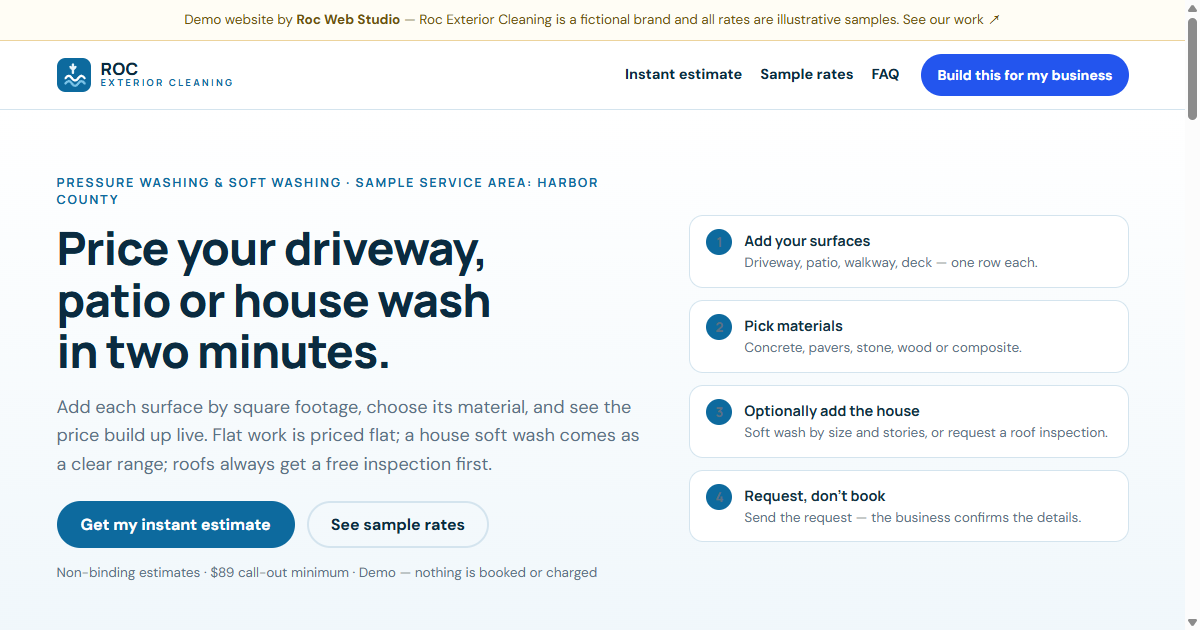
1. The calculator that captures leads. The visitor walks through a few questions, sees an estimate, and then — to receive the detailed, confirmed quote — leaves their name, phone number and email. The customer gets the instant answer they came for; you get contact details and structured project information. This is the setup most local service businesses should aim for. Curious what it looks like built out? Our cleaning business demo article walks through a working instant-quote system, including where a fixed price, a range and a human review each make sense.
2. Price ranges instead of exact numbers. If you are not comfortable showing precise prices, show ranges: most jobs of a given type fall inside a band you can display honestly, and you keep room to confirm the final number. You keep the transparency and trust without boxing yourself in.
3. A smarter form. No calculator? Add a budget dropdown and a service selector to your form. It is a lightweight way to pre-screen leads and route them properly.
The hybrid works because it matches both sides of the deal: the customer wants an answer now, and you want a conversation before you commit to a number.
Whichever you choose, get these right
- Design for phones first. Most local searches happen on a phone, often one-handed. If your tool is clumsy on a small screen, it might as well not exist.
- Ask for the minimum. Every field should earn its place. Name, phone or email, and the project basics are usually enough to start.
- Promise a response time — and keep it. "We reply within one business hour" turns a silent form into a service commitment. Then actually do it.
- Stop the spam. Use a honeypot field or a similar invisible filter so bot submissions do not bury real leads.
- Confirm automatically. An instant email or text confirmation ("Got it — we will be in touch shortly") keeps leads warm while they wait for you.
- Follow up fast. A lead left overnight goes cold. Whatever else you do, be the fastest responder in your market.
Common mistakes to avoid:
- Burying the form three menus deep.
- Promising instant quotes you cannot actually honor.
- Asking for information you do not need yet, like a full street address.
- No confirmation after submission — the customer wonders whether it went through.
- Forms that break on mobile.
FAQ
Do quote calculators actually increase conversions?
They remove the biggest unknown in a customer's decision: price. Visitors who would never fill out a "contact us" form will happily click through a calculator. How much they help depends on how accurate the estimates are and how well the tool fits your pricing, but as lead capture goes, an instant answer is hard to beat.
Can I use both a calculator and a form on my website?
Yes, and many businesses do — a calculator on high-volume service pages, a general form on the contact page. If you only want to maintain one tool, the hybrid calculator-then-capture setup covers both jobs.
How much does a quote calculator cost to build?
A simple calculator with a handful of inputs is an inexpensive build; complex tools with live mapping or integrations cost more. What matters more than the price tag is accuracy — a cheap calculator that quotes wrong numbers costs you customers.
What if my prices vary too much for a calculator?
Use ranges or "starting at" prices, or build a hybrid: the calculator collects the project details and shows a rough range, then you follow up with a firm quote. You get the speed of a calculator with the flexibility of a form.
The bottom line
A quote calculator serves customers who want an answer right now. A quote request form serves businesses that sell through conversation. For most local service businesses, the winning setup is a calculator that ends by capturing the lead.
If you would rather not figure this out alone: Roc Web Studio builds websites for small and medium-sized businesses in every industry, worldwide, including quote calculators and lead forms that work the way this article describes. Start with a free homepage concept — tell us about your business and we will give you a straight answer about what your website needs.